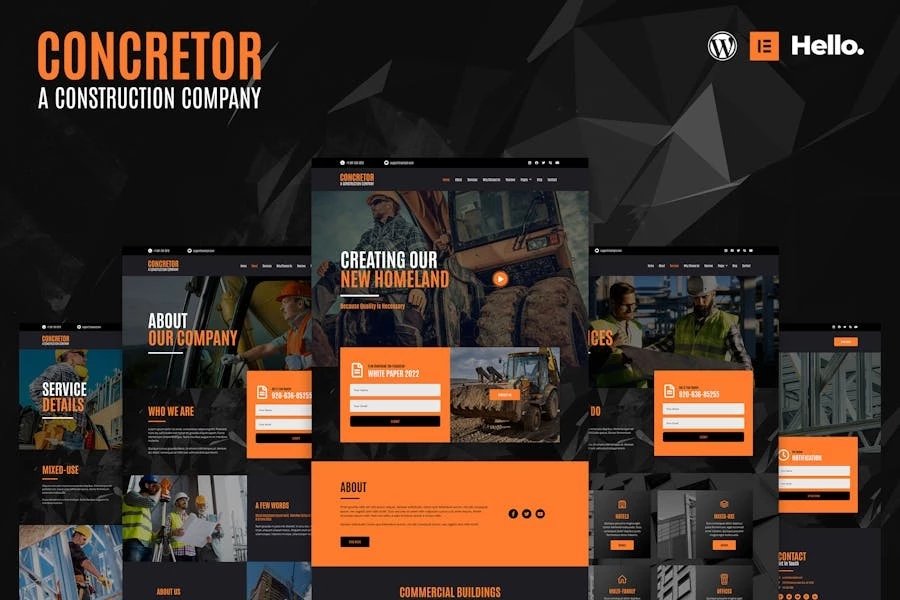
Concretor is a modern dark style Elementor Template Kit, built specifically for Real Estate and Construction. It's easy to use the pre-made template pages to quickly build your website. Contains 30 different templates and Global Kit Style.
All templates have been carefully tested on a variety of resolutions and devices to ensure that the display is always perfect. No Elementor Pro version is required, and no paid plugins are required, saving you budget. Concretor supports free lifetime upgrades, so you don't have to worry about it.
Templates:
Pages:
How to import Metform custom form:
All templates have been carefully tested on a variety of resolutions and devices to ensure that the display is always perfect. No Elementor Pro version is required, and no paid plugins are required, saving you budget. Concretor supports free lifetime upgrades, so you don't have to worry about it.
Templates:
Pages:
- Home
- About
- Services
- Why Choose Us
- Reviews
- Blog
- Contact
- Service Details
- Single Post*
- FAQ
- 404 Page
- Coming Soon
- Header
- Footer
- Services Grid
- Features
- CTA
- About
- Mission Boxes
- Logos
- Services Boxes
- Numbers
- Reviews List
- Carousel
- FAQ Table
- Contact Form
- Subscribe Form
- Quote Form
- Online Notification Form
- True zero coding: styles and effects are done within the Elementor panel
- Fully compatible with Elementor free version, NO Elementor Pro required
- Total 30 templates, includes full page templates, useful blocks
- Global theme styles for an easy site-wide style change
- Header and footer builder for flexible layout and design
- Perfectly compatible with all kinds of mobile devices
- Install and Activate the Envato Elements plugin from Plugins > Add New in WordPress
- Do not unzip
- Go to Elements > Installed Kits and click the Upload Template Kit button
- Before importing a template, ensure the Install Requirements button is clicked to activate required plugins
- Be sure to import "Global Kit Styles" first
- Edit page or post with Elementor, click "Envato Elements" icon, insert Template you need
How to import Metform custom form:
- Click "Edit Form"
- Choose a new blank form, click "Edit Form"
- In the newly opened editor window, insert "Block - Contact Form"
- Click "Update & Close"